PaymentPutty User Guide

Build a checkout rule in minutes

PaymentPutty replaces custom checkout development with a simple four-step wizard. Pick a starter template (or start from scratch), tell it where to appear, what should trigger it, and what it should do — your rule goes live at checkout the moment you save.

Wizard · Step 1 of 4 · Basic Info
Name your rule
Pick where it appears
No code required
Then: Trigger · Action · Configure
Live at checkout when you save
On This Page
How It Works

The same wizard, every time

Every rule in PaymentPutty — no matter how simple or complex — flows through the same four-step wizard. Watch one come together in real time, then we'll walk through each step with screenshots from the actual app.

Wizard Walkthrough

From "Create Rule" to live in five screens

Here's what the wizard actually looks like inside the BigCommerce control panel. We've followed a real rule — a Minnesota road-improvement fee on shipping orders over $100 — all the way through.

Start

Pick a starter template — or build from scratch

Click Create Rule and PaymentPutty offers a few proven starting points: Shipping Insurance, State-Based Shipping Fee, and Donation. Each one pre-fills the wizard with sensible defaults so you can be live in under a minute. If none of them fit, choose Custom rule and you'll start from a blank wizard.

  • Templates are just shortcuts — every option is still editable.
  • Custom rules give you the full pick-list across all four steps.
  • You can save a rule as a draft at any point and come back later.
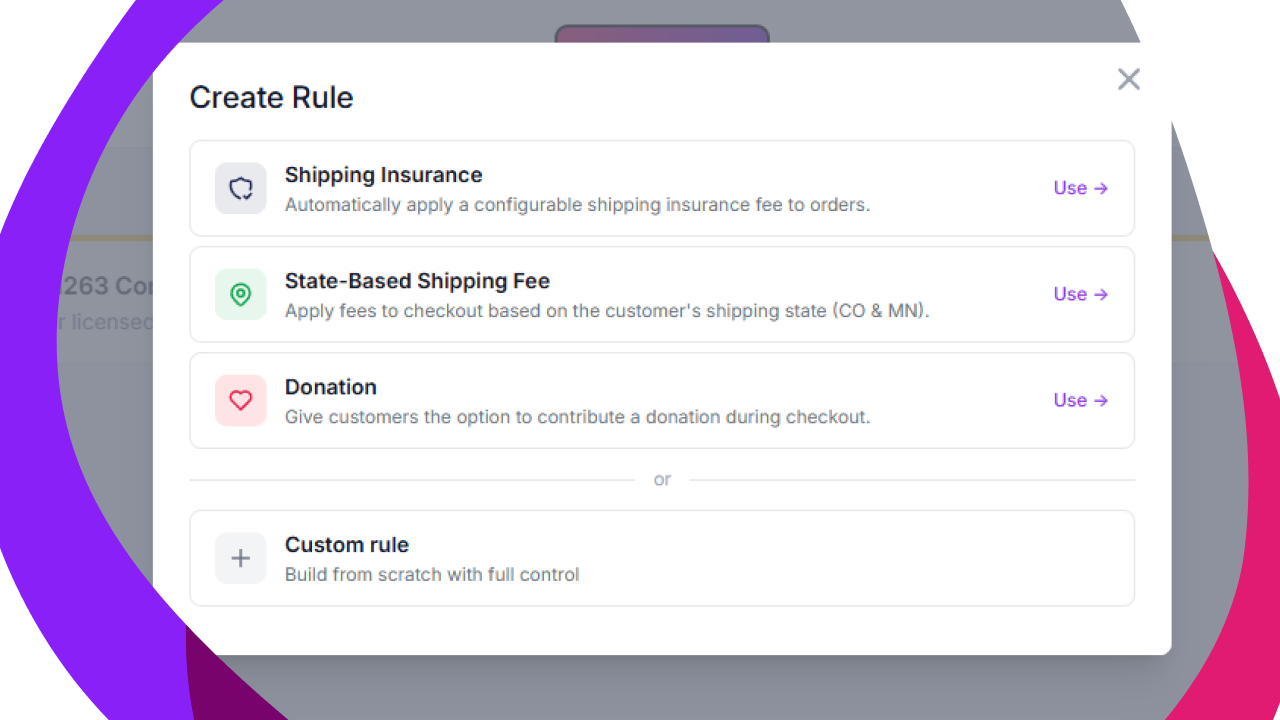
PaymentPutty Create Rule modal showing Shipping Insurance, State-Based Shipping Fee, Donation, and Custom rule options
Step 1 · Basic Info

Name it. Tell it where to appear.

Give the rule a name your team will recognize on the orders list and inside the admin — something like "Minnesota Road Improvement Fee" — then pick which step of checkout it belongs to. PaymentPutty supports every native BigCommerce step plus the sidebar order-summary panel.

  • Customer Step — email, sign in, account creation
  • Shipping Step — address and method selection
  • Billing & Payment Steps — addresses and payment
  • Entire Page or Sidebar — appears across the whole flow
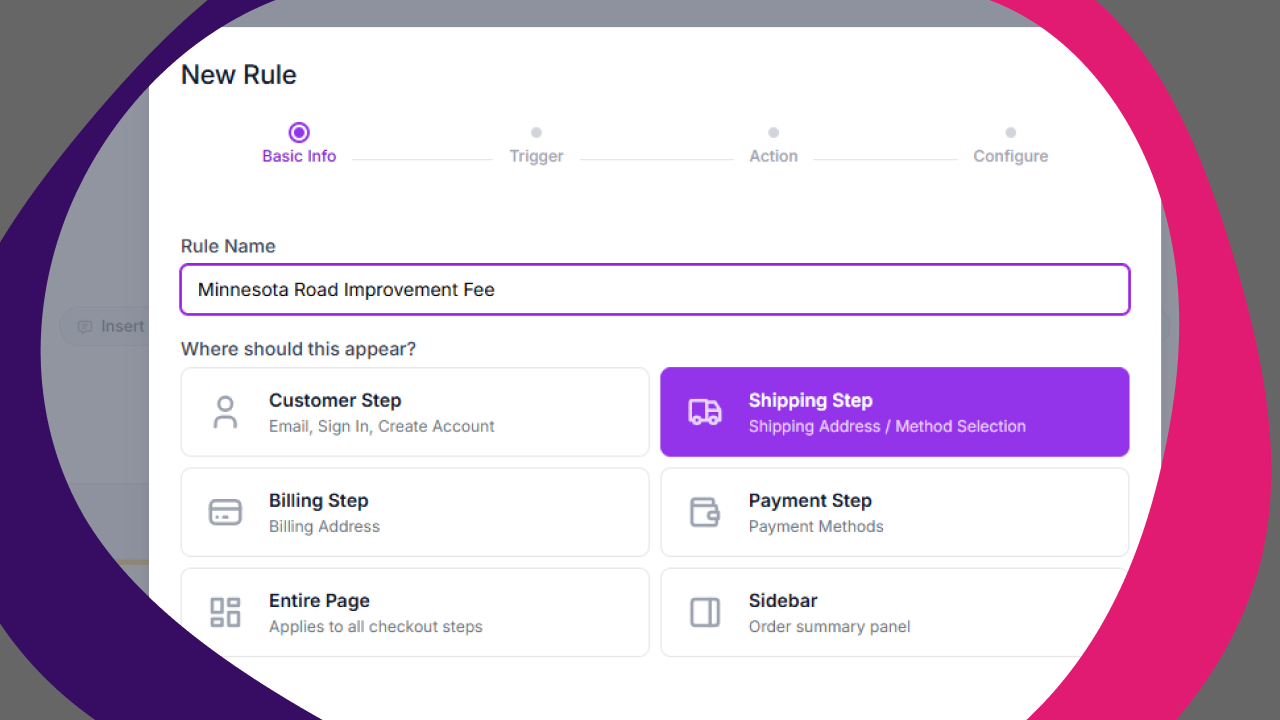
PaymentPutty wizard Step 1: rule name field with Minnesota Road Improvement Fee, and step picker with Shipping Step selected
Step 2 · Trigger

Decide when the rule should fire

A rule can run on every order, or only when checkout state matches conditions you set. Mix and match attributes like shipping state, cart total, product category, customer group, or anything else PaymentPutty exposes — joined with AND or OR.

  • Pick a field (Shipping State, Cart Total, Product SKU, etc.)
  • Pick an operator (equals, is greater than, contains, …)
  • Enter a value, and add more conditions as needed.
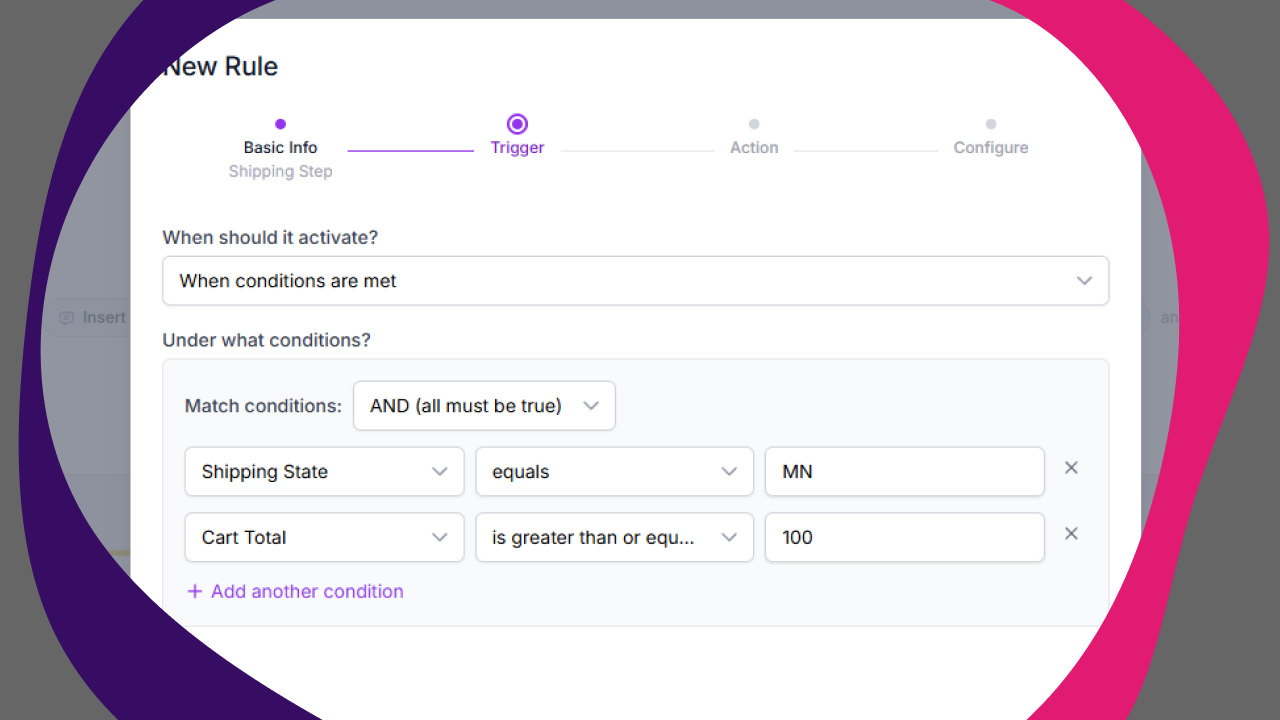
PaymentPutty wizard Step 2: condition builder with Shipping State equals MN and Cart Total greater than or equal to 100
Step 3 · Action

Choose what the rule actually does

Pick an action type and PaymentPutty handles the rest. Available actions cover the most common checkout customization needs — messaging, custom HTML, forced acknowledgements, file uploads, form fields, and (with the Fee Engine add-on) generic fees, product-custom-field fees, and weight-based fees.

  • Message, Banner, or Callout — promotional or informational copy
  • Forced Acknowledgement — checkbox the customer must check
  • Form Field — capture data at checkout
  • File Upload & HTML / Script — Pro-tier extensibility
  • Generic / Product / Weight-Based Fee — Fee Engine add-on
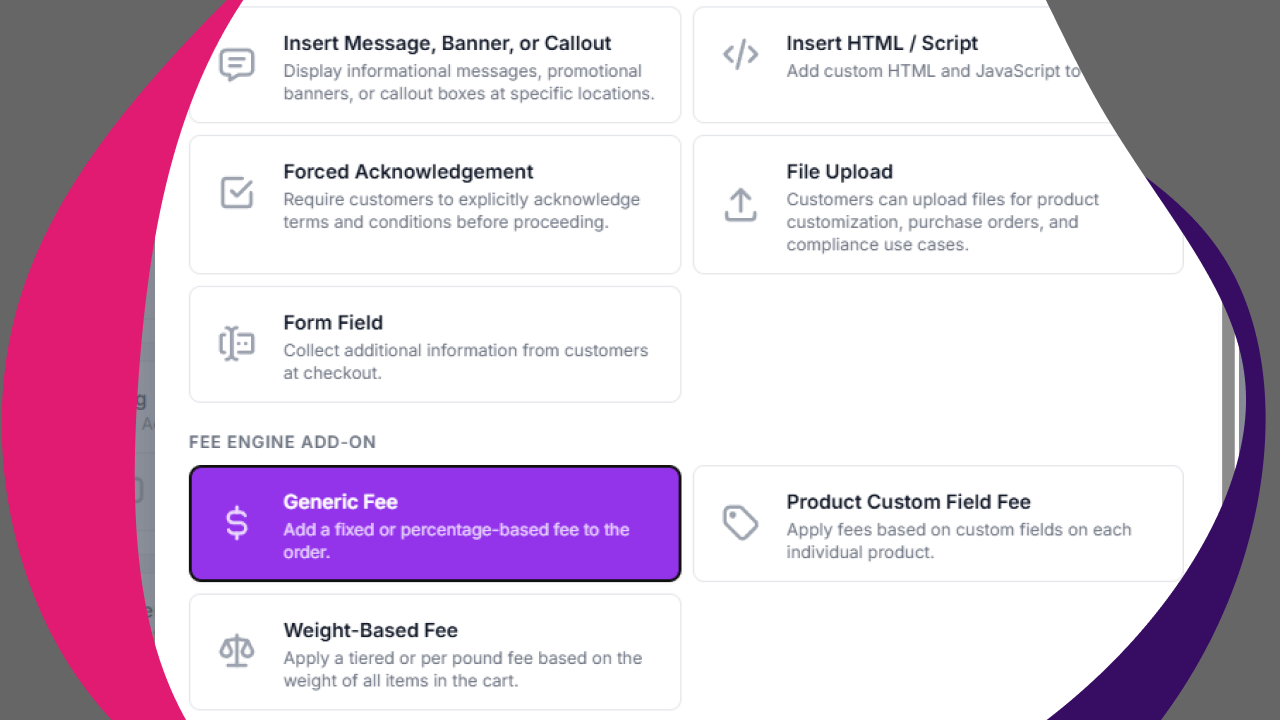
PaymentPutty wizard Step 3: action type picker with Generic Fee highlighted alongside Message, Forced Acknowledgement, File Upload, Form Field, and Fee Engine options
Step 4 · Configure

Fill in the details and save

The final step changes shape based on the action you picked. For a fee, you'll set the calculation method (fixed amount or percentage), whether it's forced or optional, and where it should be inserted in the checkout layout. The name you enter here also shows up as the line item on the order itself.

  • Fixed amount or percentage-based
  • Forced (always applies) or optional (customer opt-in)
  • Pick the insertion point — preferred location, or pin it before/after a specific element
  • Hit Save and the rule is live on the next checkout pageload.
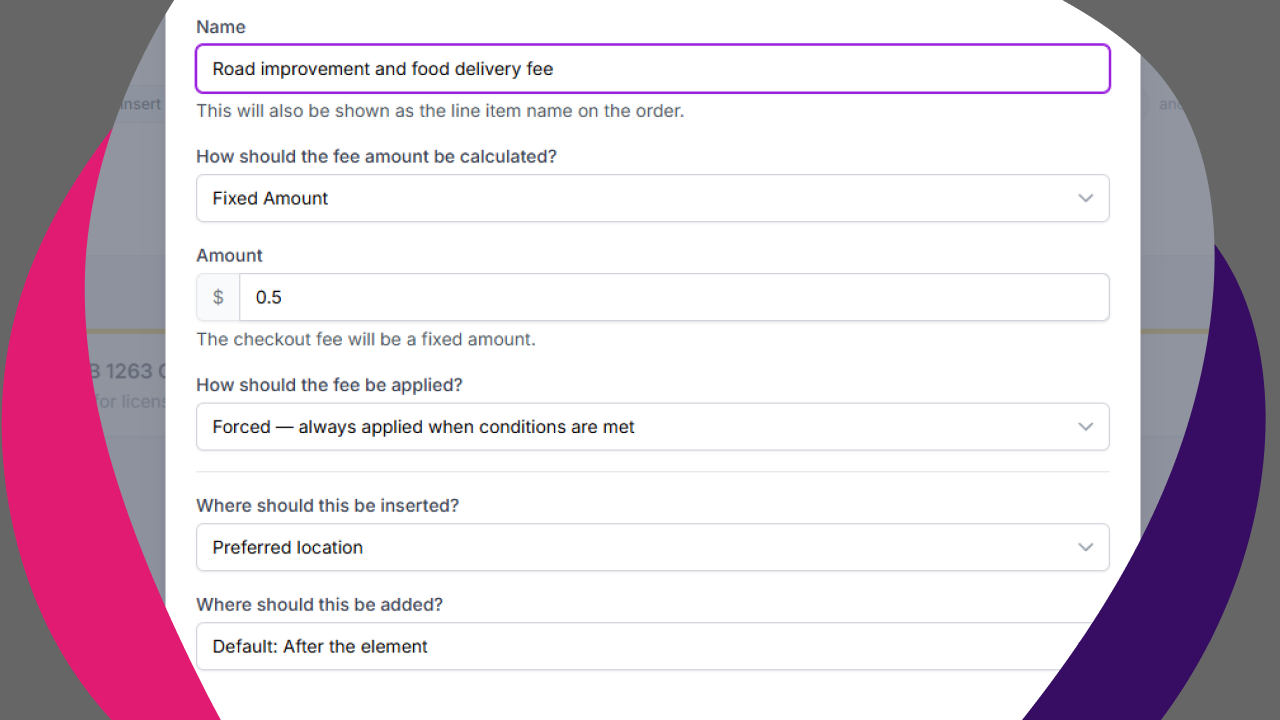
PaymentPutty wizard Step 4: fee configuration with name field, fixed amount calculation, $0.50 amount, forced application, and preferred location placement
Recipes

A few rules to copy-and-tweak

Once you've seen the wizard, the only real question is what to build. Here are six rules you can recreate in a few minutes — feel free to mix the building blocks however your business needs.

Basic Tier
Age-verification acknowledgement

Require shoppers to confirm they're 21+ before they can complete checkout on alcohol or tobacco SKUs.

Trigger: Cart contains category = "Alcohol"
Action: Forced Acknowledgement on Payment step
Basic Tier
Cold-chain shipping notice

Show a yellow banner reminding customers that perishable orders ship Mon–Wed only — and warn them about weekend orders.

Trigger: Cart contains category = "Perishable"
Action: Message / Banner on Shipping step
Basic Tier
Capture a PO number at checkout

B2B customers often need to attach an internal purchase order. Add a required form field that writes the PO to the order record.

Trigger: Customer Group = "Wholesale"
Action: Form Field on Billing step
Pro Tier
Upload a contractor license

Collect a state license photo at checkout, attached directly to the order so fulfillment can verify before shipping regulated goods.

Trigger: Cart contains category = "Regulated"
Action: File Upload on Shipping step
Fee Engine
State-based road-improvement fee

Apply a flat $0.50 fee to Minnesota orders above $100 to cover state-mandated road infrastructure costs (the exact rule shown in our walkthrough).

Trigger: Shipping State = "MN" AND Cart Total ≥ 100
Action: Generic Fee — Fixed $0.50, Forced
Fee Engine
Round-up donation at checkout

Give shoppers the option to round up to the nearest dollar (or add a flat $1) for your charitable partner — opt-in, always visible.

Trigger: Always on (no conditions)
Action: Generic Fee — Fixed $1.00, Optional
Basic vs. Pro

Which tier do I need?

The wizard looks the same on both tiers — what changes is which action types you can pick at Step 3. Most messaging and form-collection use cases work on Basic; anything involving file uploads, custom HTML, or JavaScript needs Pro.

Basic
Customize Checkout Messaging
$19 / month

Pick Basic when your rule needs to say something or ask something — messages, banners, acknowledgements, and structured form fields. No coding required, no engineering ticket.

  • Checkout messaging, banners, and callouts
  • Forced acknowledgements with custom copy
  • Form fields to collect customer data
  • Order Confirmation page messaging
  • Full wizard + condition engine
Install Basic
Industry Ideas

A few sparks for your industry

These are quick examples — one rule per vertical — to show how the wizard adapts to very different businesses. For a deeper dive into any industry, visit paymentputty.com.

Automotive
Oversized-item shipping fee

Trigger a flat freight surcharge whenever a vehicle bumper, tonneau cover, or other oversized SKU lands in the cart — no more guessing at checkout.

Food & Beverage
Age-verification on alcohol

A forced acknowledgement on any cart containing wine, beer, or spirits — text and styling tuned to your brand voice.

Home & Furniture
White-glove delivery upsell

Offer an optional in-home delivery fee for items over a weight threshold — customers opt in, and the line item shows up on the order.

Regulated Industries
Restricted-state messaging

Show a clear "we can't ship this product to your state" banner the moment a customer enters a restricted shipping ZIP.

Medical Devices
Professional-license capture

A Pro-tier file upload that collects the buyer's medical license PDF and attaches it directly to the order for compliance review.

Packaging & Print
Artwork & dieline upload

Use a Pro-tier file upload to gather customer artwork at checkout so production can start the moment the order clears payment.

Ready to Take Control of Your Checkout?

Start with the app for instant value, or talk to our team about engineering something custom — built exactly for how your business works.